The Fastest Way to Redline Mechanical PDFs

Built for engineering teams that turn complex hardware into reality. Review manufacturing drawings faster with purpose-built mechanical markup tools—while your drawings stay securely on your machine.
30 days to test on your own drawingsNo credit card required

Demo Video Ready

Add NEXT_PUBLIC_MUX_DEMO_PLAYBACK_ID to your .env file to render the Mux-hosted walkthrough below the hero.

Native Mechanical Symbols
BOM balloons, flag notes, dimension leaders, and full GD&T frames built in from day one.
GD&T That Feels Right
Create clean feature control frames with proper formatting and scale-aware placement.
Keyboard-Driven Speed
Switch tools quickly, duplicate markups fast, and move through reviews with fewer clicks.
Screenshot Markup
Paste an image or screenshot, mark it up with the same tools, and send quick feedback without building a full PDF.
Features
Stop Using Generic PDF Tools for Engineering Work
Most PDF editors were built for contracts and legal documents. Mechanical drawing reviews are different.
You need precision, speed, clean symbols, and output that looks right in front of design, quality, and manufacturing teams.
PDF Engineer removes the friction between finding a problem in a drawing and marking it clearly.

Drawing Utilities That Matter

Combine PDFs, rotate pages, zoom smoothly, and export clean redlined files ready for release.

PDF Engineer document actions

Precision Placement

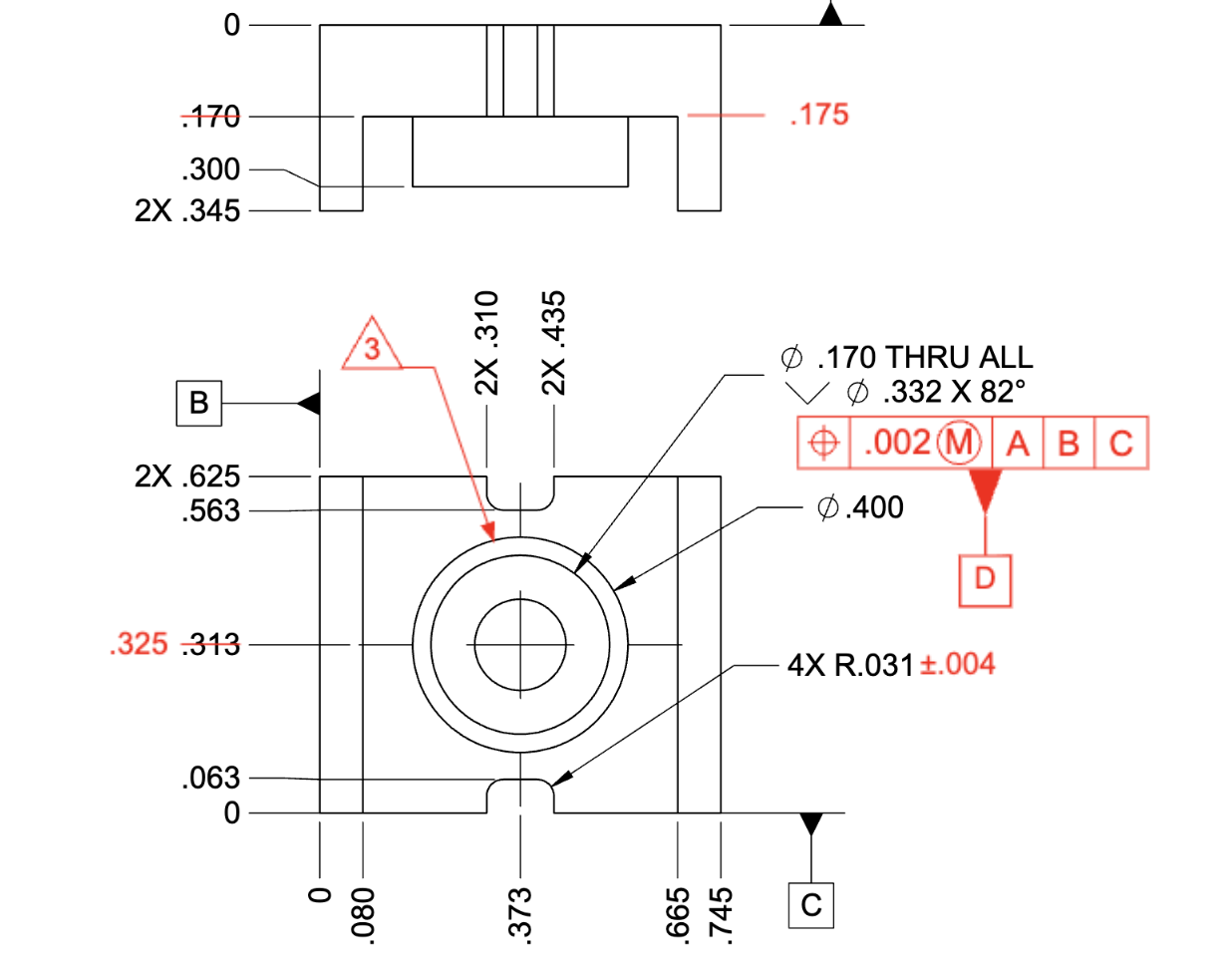
Place symbols exactly where you intend with clean alignment, consistent sizing, and professional-looking output.

PDF Engineer example mechanical markup

Clean Output, Anywhere

Save a standard PDF that opens in Acrobat, Bluebeam, or the document viewers used in your PLM workflow.

PDF Engineer
Acrobat
SAP
PTC
SharePoint
Siemens
Dessault Systemes
Autodesk

What PDF Engineer is for

PDF Engineer is PDF redlining software for mechanical engineering teams. It is designed for reviewing manufacturing drawings, markups, and release packages when a general-purpose PDF editor is too slow or too awkward for technical work.

Teams use PDF Engineer for DFM feedback, ECO and ECR redlines, supplier clarification packages, inspection notes, and drawing reviews that need GD&T, leaders, callouts, flag notes, and clean exported PDFs.

For design reviews

Capture change requests quickly, keep annotations consistent, and move from review comments to released drawings faster.

For manufacturing feedback

Mark tolerance issues, assembly concerns, and producibility questions directly on the PDF package your team already shares.

For supplier communication

Create clear clarification packages with standard PDFs that vendors can open without needing your internal engineering stack.

Security

Security by Design

PDF Engineer processes all drawings locally on your workstation. Engineering documents are never uploaded to external servers for rendering, markup creation, review, or export.

Internet connectivity is used only for account management, subscription validation, and software updates.

Local workstation processing

Rendering, markup creation, review, and export happen on your machine.

No drawing uploads

Engineering documents are not uploaded to PDF Engineer servers for document work.

Limited internet use

Connectivity supports account management, subscriptions, and updates.

Comparison
Why Not Just Use Acrobat?
If your work lives in engineering drawings, your redline tool should too.
Generic PDF Editors
PDF Engineer
Generic shapes & text boxes
Native BOM, GD&T, flag notes
Multi-step symbol formatting
One-click mechanical tools
UI built for documents
UI built for drawings
Cluttered, bloated menus
Focused, fast workflow
Image Markup

Not just for PDFs. Paste a screenshot and mark it up.

When feedback starts as a CAD screenshot, inspection photo, shop-floor image, or clipped drawing detail, paste it into PDF Engineer and use the same leaders, notes, symbols, and callouts you use on PDFs.

No conversion step
Same markup tools
Fast visual feedback

CAD screenshots

Mark a detail from a model or drawing view before someone exports a formal PDF package.

Inspection photos

Call out a tolerance issue, fit concern, or measured feature directly on the image at hand.

Clipped drawing details

Paste the small part of a drawing that needs attention and send a focused redline quickly.

Complex hardware

Built for teams that build complex hardware.

From first design review to released manufacturing drawing, PDF Engineer helps mechanical, manufacturing, quality, and supplier teams communicate changes clearly.

One drawing. Every review team.
01

Design Engineering

Review dimensions, tolerances, GD&T, assembly details, and manufacturability before release.

02

Manufacturing Engineering

Capture producibility issues, shop-floor feedback, and assembly concerns directly on the drawing.

03

Quality & Inspection

Document tolerance issues, nonconformances, inspection findings, and required drawing changes.

04

Supplier Collaboration

Send clear, standard PDF redlines without requiring suppliers to adopt another proprietary review platform.

ROI calculator

Estimate the cost of slow drawing reviews

See how much engineering time and labor cost your team could recover with a faster redlining workflow.

Step 1

Your drawing-review team

Labor baseline
$

Step 2

Your expected efficiency gain

Not sure? Start with 20%.

20%
5%50%

This is an estimate only. PDF Engineer does not guarantee a specific savings percentage.

Step 3

PDF Engineer cost

$

Defaults to the current annual plan price.

Advanced assumptions

PDF Engineer ROI Estimate

$18,277
Estimated annual net savings
288
hours reclaimed each year
1,015%
estimated first-year ROI
1.1 months
estimated payback period
0.1 FTE
capacity recovered
Gross labor savings
$20,077
Annual software cost
$1,800

Equivalent to recovering 0.1 full-time employees of engineering capacity.

Based on:

  • 6 reviewers
  • $145,000 average fully burdened employee cost
  • 5 hours per reviewer per week spent on drawing reviews
  • 20% estimated efficiency improvement
  • 6 PDF Engineer licenses

Estimates are based on the information provided and are intended for planning purposes. Actual savings will vary based on workflow, adoption, and usage.

Plans & Pricing
Simple pricing
Test every feature on your own drawings for 30 days. Then choose one simple paid subscription per user.
30-day free trial
$25
per month, per user when billed annually.
Start 30-day trial

Use your own drawings and workflows. Every feature is included.
Already evaluated it? Subscribe now.

Education Access

Free for engineering students and educators

PDF Engineer is free for students, professors, instructors, and university labs with a valid .edu email address. Download the app and use the in-app education flow for mechanical drawing markups, GD&T redlines, capstone reviews, and class projects without paying for a subscription.

Download PDF Engineer
Frequently Asked Questions
Questions from mechanical teams evaluating PDF Engineer.Clear answers before you roll it out.
Download PDF Engineer and test every feature for 30 days using the drawings and review workflows your team already works with. Your drawing files stay on your machine throughout the trial.
For mechanical drawing redlines, markups, and review workflows, yes. Teams can still keep Acrobat for broader document management tasks outside engineering review.
Yes. PDF Engineer exports standard PDF files that open in major viewers such as Acrobat, Bluebeam, and the document viewers used inside many PLM workflows.
Yes. You can paste an image file or screenshot into PDF Engineer and use the same markup tools you use on PDFs, which is useful for quick CAD views, drawing details, inspection photos, and shop-floor feedback that does not need a full PDF package.
Usually no. Most teams review drawings in PDF Engineer and then attach the redlined PDF back into their existing PLM, ERP, or document control process.
A .pdf-eng file is a project file for editable work in PDF Engineer. It preserves annotations and review state while letting teams export a standard PDF when they are ready to share or release.
Yes. PDF Engineer uses simple per-user licensing with monthly and annual billing options.
Yes. PDF Engineer is free for students and educators with a valid .edu email address, including engineering students, professors, instructors, and university labs that need a PDF editor for mechanical drawing markups.
Mechanical design, manufacturing, supplier quality, and product development teams use PDF Engineer for ECO and ECR reviews, DFM feedback, supplier clarification packages, and inspection markups.
Spend less time marking up drawings. More time improving them.
Test PDF Engineer on your own drawings for 30 days. Give your team a faster way to review, redline, and communicate changes—without sending engineering drawings to the cloud.

Full feature access • Your drawings stay local

PDF Engineer
The fastest way to redline mechanical PDFs.
© 2026 PDF Engineer. All rights reserved.